Agent Definition
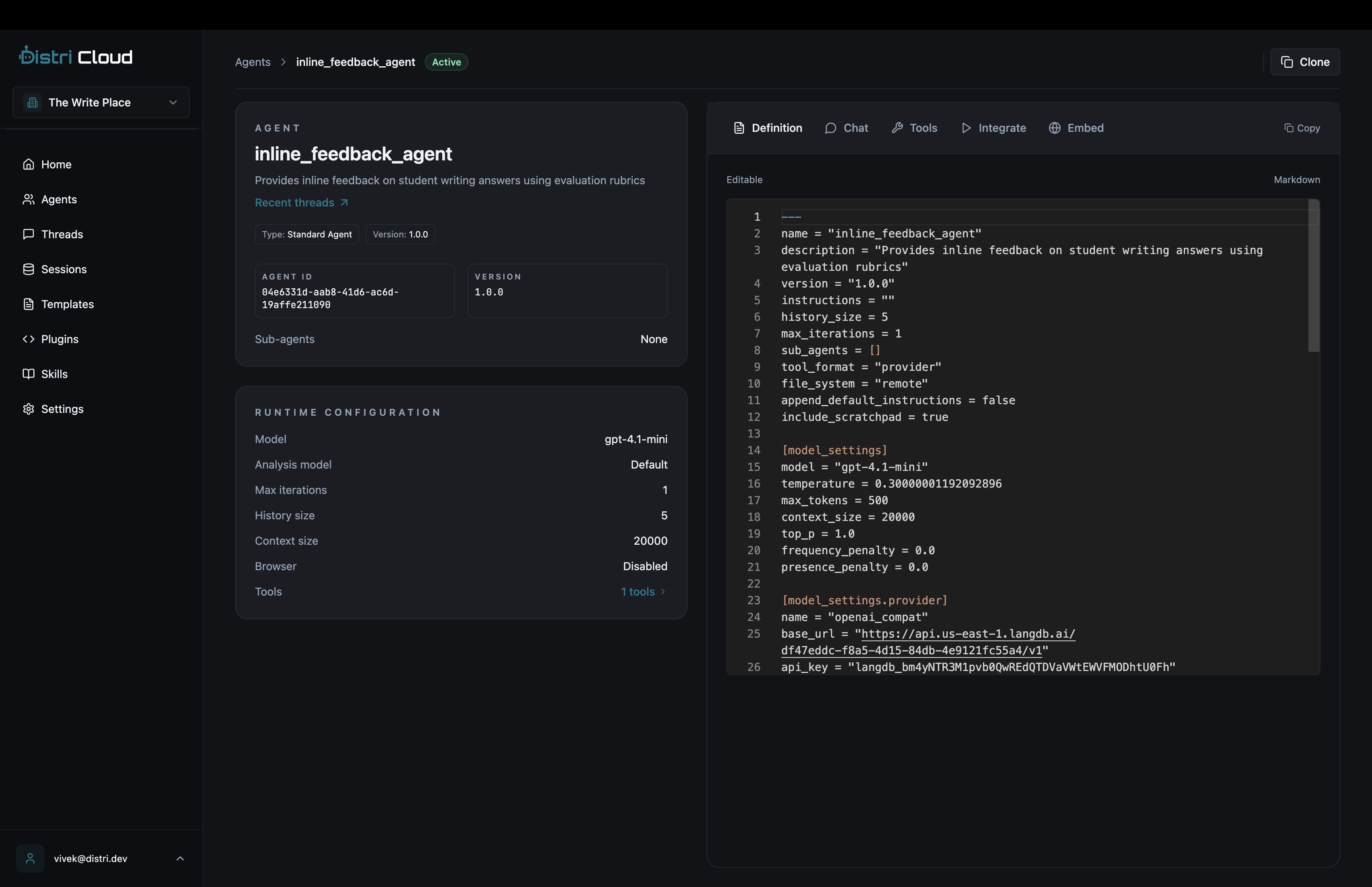
Agents in Distri are defined using Markdown files with TOML frontmatter. This format allows you to specify agent behavior, capabilities, model settings, and tool configurations.
Basic Structure
An agent definition file (e.g., agent.md) contains:
- TOML frontmatter: Configuration metadata between
---markers - Markdown content: Instructions defining the agent's role and capabilities
---
name = "my_agent"
description = "A helpful assistant"
max_iterations = 3

[tools]
external = ["*"]

[model_settings]
model = "gpt-4.1-mini"
temperature = 0.7
max_tokens = 500
---

# ROLE
You are a helpful assistant that answers questions clearly and concisely.

# CAPABILITIES
- Answer questions about various topics
- Provide explanations and examples
- Help with problem-solving
Core Properties
Required Fields
| Property | Type | Description |
|---|---|---|
name | string | Unique identifier for the agent. Must be a valid JavaScript identifier (alphanumeric + underscores, cannot start with number). |
description | string | Brief description of the agent's purpose. |
Agent Configuration
| Property | Type | Default | Description |
|---|---|---|---|
version | string | "0.2.2" | Version of the agent definition. |
instructions | string | "" | The markdown content below the frontmatter (set automatically). |
max_iterations | number | None | Maximum number of execution iterations. |
history_size | number | 5 | Number of previous messages to include in context. |
icon_url | string | None | URL to agent icon for A2A discovery. |
Model Settings
Configure the LLM used by the agent under [model_settings]:
[model_settings]
model = "gpt-4.1-mini"
temperature = 0.7
max_tokens = 1000
context_size = 20000
top_p = 1.0
frequency_penalty = 0.0
presence_penalty = 0.0
| Property | Type | Default | Description |
|---|---|---|---|
model | string | "gpt-4.1-mini" | Model identifier (e.g., gpt-4, claude-3-opus). |
temperature | float | 0.7 | Sampling temperature (0.0-2.0). Lower = more deterministic. |
max_tokens | number | 1000 | Maximum tokens in response. |
context_size | number | 20000 | Maximum context window size. |
top_p | float | 1.0 | Nucleus sampling parameter. |
frequency_penalty | float | 0.0 | Penalty for token frequency (-2.0 to 2.0). |
presence_penalty | float | 0.0 | Penalty for token presence (-2.0 to 2.0). |
Model Provider
Configure custom model providers under [model_settings.provider]:
[model_settings.provider]
name = "openai"

# Or for custom endpoints:
[model_settings.provider]
name = "openai_compat"
base_url = "https://your-endpoint.com/v1"
api_key = "your-api-key"  # Optional if using secrets
Available providers: openai, openai_compat, vllora
Analysis Model Settings
Optional lower-level model for lightweight analysis tasks (e.g., browser observations):
[analysis_model_settings]
model = "gpt-4.1-mini"
temperature = 0.3
max_tokens = 500
Tools Configuration
Configure which tools the agent can use under [tools]:
[tools]
builtin = ["final", "transfer_to_agent"]
external = ["*"]

[[tools.mcp]]
server = "fetch"
include = ["*"]
exclude = ["delete_*"]

[tools.packages]
search = ["search", "search_images"]
| Property | Type | Description |
|---|---|---|
builtin | string[] | Built-in tools to enable (e.g., final, transfer_to_agent). |
external | string[] | External tools from client. Use ["*"] for all. |
packages | object | DAP package tools: { package_name: ["tool1", "tool2"] } |
mcp | array | MCP server configurations (see below). |
MCP Tool Configuration
[[tools.mcp]]
server = "fetch"           # MCP server name
include = ["fetch_*"]      # Glob patterns to include
exclude = ["fetch_secret"] # Glob patterns to exclude
Tool Call Format
Control how the agent formats tool calls:
tool_format = "xml" # Options: xml, jsonl, code, provider, none
| Format | Description |
|---|---|
xml | Streaming-capable XML format (default). Example: <search><query>test</query></search> |
jsonl | JSONL with tool_calls blocks. |
code | TypeScript/JavaScript code blocks. |
provider | Native provider format. |
none | No tool formatting. |
Sub-Agents
Define agents that this agent can transfer control to:
sub_agents = ["research_agent", "writing_agent", "review_agent"]
When combined with the transfer_to_agent builtin tool, enables agent handover workflows.
Skills (A2A)
Define A2A-compatible skills for agent discovery:
[[skills]]
id = "search"
name = "Web Search"
description = "Search the web for information"
Advanced Configuration
Filesystem Mode
Control where filesystem operations run:
file_system = "remote" # Options: remote, local
| Mode | Description |
|---|---|
remote | Run filesystem/artifact tools on the server (default). |
local | Handle via external tool callbacks (client-side). |
Prompt Configuration
append_default_instructions = true  # Include default system prompts
include_scratchpad = true           # Include persistent scratchpad in prompts
context_size = 32000                # Override model context size for this agent
Feature Flags
enable_reflection = false           # Enable reflection subagent
enable_todos = false                # Enable TODO management
write_large_tool_responses_to_fs = false  # Write large outputs as artifacts
Browser Configuration
Enable browser automation for the agent:
[browser_config]
enabled = true
headless = true
persist_session = false
Custom Partials
Define Handlebars partials for custom prompts:
[partials]
custom_header = "prompts/header.hbs"
custom_footer = "prompts/footer.hbs"
Hooks
Attach named hooks to the agent:
hooks = ["log_events", "validate_output"]
User Message Overrides
Customize how user messages are constructed:
[user_message_overrides]
include_artifacts = true
include_step_count = true

[[user_message_overrides.parts]]
type = "template"
source = "context_prompt"

[[user_message_overrides.parts]]
type = "session_key"
source = "current_observation"
Registering Agents
Push your agent to Distri using the CLI:
# Login to Distri Cloud
distri login

# Push agents from current directory
distri push

# Or run locally
distri serve --port 8080
Agents are automatically discovered from the agents/ directory or any .md files with valid agent frontmatter.
API Endpoints
- List Agents
- Get Agent
- Agent Card (A2A)
GET /agents
Response:
[
  {
    "id": "maps_agent",
    "name": "maps_agent",
    "description": "Operate Google Maps tools to execute user instructions"
  }
]
GET /agents/{agent_id}
Response:
{
  "id": "maps_agent",
  "name": "maps_agent",
  "description": "Operate Google Maps tools to execute user instructions",
  "tools": [
    {
      "name": "set_map_center",
      "description": "Set map center to latitude, longitude",
      "type": "function",
      "parameters": { ... }
    }
  ]
}
GET /agents/{agent_id}/.well-known/agent.json
Returns A2A-compatible agent card with metadata and tool schemas for agent discovery.
Complete Example
---
name = "research_agent"
description = "Research assistant that finds and summarizes information"
version = "1.0.0"
max_iterations = 5
history_size = 10

[tools]
builtin = ["final"]
external = ["*"]

[[tools.mcp]]
server = "fetch"
include = ["*"]

[model_settings]
model = "gpt-4"
temperature = 0.5
max_tokens = 2000
context_size = 32000

[model_settings.provider]
name = "openai"

sub_agents = ["writing_agent"]
enable_reflection = true
---

# ROLE
You are a thorough research assistant. When given a topic, you search for
relevant information, evaluate sources, and provide comprehensive summaries.

# CAPABILITIES
- Search the web for information on a given topic
- Create concise summaries of long-form content
- Properly attribute information to sources
- Hand off to writing_agent for final document creation

# TASK
Research the following topic and provide a detailed summary with citations:
{{task}}
Best Practices
- Clear Role Definition: Be specific about the agent's personality and behavior in the instructions.
- Tool Mapping: List capabilities that correspond to available tools so the LLM understands what actions it can take.
- Iteration Limits: Set
max_iterationsbased on task complexity to prevent runaway loops. - Model Selection: Use faster models (gpt-4.1-mini) for simple tasks, more capable models (gpt-4, claude-3-opus) for complex reasoning.
- Temperature Tuning: Lower (0.3-0.5) for factual tasks, higher (0.7-0.9) for creative tasks.
- Context Management: Set appropriate
history_sizeandcontext_sizebased on your use case.
Real-World Examples
Teaching Assistant Agent
This agent from an education platform evaluates student writing and provides feedback:
---
name = "teaching_assistant"
description = "AI teacher that evaluates student writing"
version = "1.0.0"
max_iterations = 12

[model_settings]
model = "gpt-4.1-mini"
max_tokens = 2000

[tools]
external = ["get_lesson_state"]
builtin = ["final"]
---

# ROLE
You are Teacher Ailynn, a warm and encouraging writing teacher for primary school students.

# CAPABILITIES
- Read the full lesson context provided in the message
- Offer targeted hints without giving away answers
- Evaluate student answers using the evaluation tools
- Provide specific feedback on what the student did well and what to improve

# RESPONSE STYLE
- Use rich text formatting (bold, italics, bullet points)
- Be specific to the student's actual answer
- Acknowledge what they did well before suggesting improvements
- Keep language age-appropriate

# TASK
{{task}}

{{#if available_tools}}
# TOOLS
{{{available_tools}}}
{{/if}}
Browser Automation Agent
This agent controls a browser to perform web automation tasks:
---
name = "browsr"
description = "Browser automation agent with AI copilot"
max_iterations = 30

[model_settings]
model = "gpt-4.1-mini"
temperature = 0.2

[tools]
external = ["*"]
builtin = ["final"]

[browser_config]
enabled = true
headless = true
---

# ROLE
You are a browser automation agent. You interact with web pages using browser commands.

# CORE LOOP
1. Read the current browser state from the observation
2. Decide the next action based on the user's goal
3. Execute exactly one browser command per step
4. Evaluate the result before proceeding

# TASK
{{task}}

{{#if available_tools}}
# TOOLS
{{{available_tools}}}
{{/if}}

{{> reasoning}}
Handlebars Templates
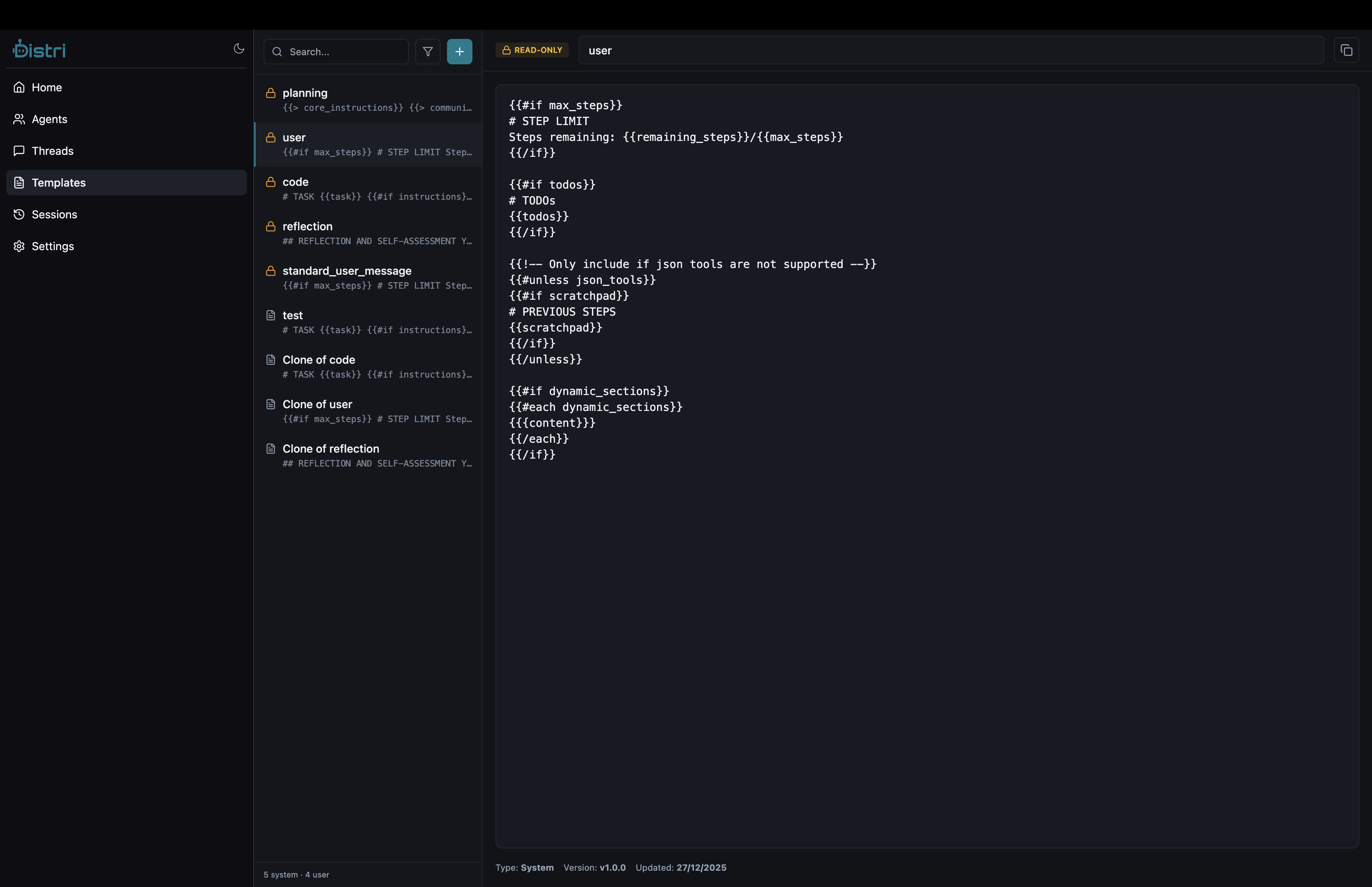
Agent instructions support Handlebars template syntax for dynamic content:
| Placeholder | Description |
|---|---|
{{task}} | The user's input message |
{{{available_tools}}} | Auto-generated tool descriptions (triple braces for unescaped HTML) |
{{> reasoning}} | Include the reasoning partial (adds structured thinking section) |
{{#if condition}}...{{/if}} | Conditional sections |
Dynamic Sections via getMetadata
When using the Chat component with getMetadata, values from dynamic_sections become available as template variables:
<Chat
  agent={agent}
  threadId="my-thread"
  getMetadata={async () => ({
    dynamic_sections: {
      user_context: 'The user is on the billing page',
      available_actions: 'upgrade, downgrade, cancel',
    },
  })}
/>
In the agent definition, reference these with Handlebars:
# CURRENT CONTEXT
{{user_context}}

# AVAILABLE ACTIONS
{{available_actions}}
References
- In-Product Tools, Define external tools agents can call
- Getting Started, Initial setup guide
- Lifecycle Hooks, Hook into agent execution